
An eye dropper tool should be baked into PowerPoint
If you’ve used drawing or photo editing applications such as Illustrator or Photoshop, you will be familiar with their color picker or eye dropper tools, which enable you to extract a color from an image so the same color can be added to other objects. I wish PowerPoint offered this same functionality, but alas it doesn’t. Luckily, there are many outside color picker apps that can be leveraged in conjunction with PowerPoint.
Why do I need an eye dropper tool?
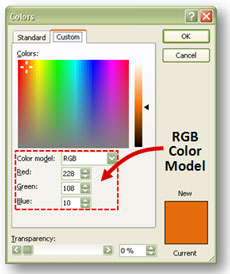
When you open up the More Fill Colors menu, you have the option of entering a specific RGB color value
Most presenters haven’t memorized the RGB values (Red-Green-Blue color model) for their corporate colors. If you’re trying to match colors with a logo image or with colors used on your corporate website, an eye dropper tool can help you to isolate and replicate the colors you need for objects in your PowerPoint presentation. You can ensure the look and feel of your presentation matches your company’s branding.
You can also use an eye dropper tool to cover up a portion of an image you’re using in your presentation. If you don’t have Photoshop, you can use a color picker tool to match the color of an overlapping shape with the background color of an image. For example, you might want to cover up some words in an image and replace it with your own text.
Eye dropper tool options
If you ever look for an eye dropper or color picker tool online, you’ll run into a number of freeware options (ColorMania, ColorPic, Instant Eyedropper, etc.). Over the years, I tried a number of different freeware applications with mixed results. If the application didn’t crash randomly, its usability would suck or it would be overly complicated for my needs. pptXTREME created a color picker add-in for pre-PowerPoint 2007 versions, but it was overpriced at $19.95.
Recommended tool: Color Cop
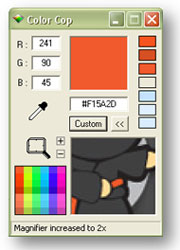
Color Cop's magnifier comes in handy when you're trying to isolate a specific color
I haven’t tested all of the different eye dropper tools available, but I have found one that works well for me. Color Cop created by Jay Prall is simple, straightforward, and stable. His free eye dropper tool includes a built-in magnifier, color preview, and a few other features. Every PowerPoint ninja needs a reliable color picker tool in their PowerPoint toolbox. Color Cop fits the bill for me until Microsoft decides to build this functionality into PowerPoint or someone develops a PowerPoint 2007 add-in.



April 18th, 2009 9:56 am
…there is already a nice PPT add-in that supports color-copying between different shapes / objects within PPT: The pptXtreme ColorPicker for Powerpoint (see http://www.pptxtreme.com/colorpicker.asp for more details). I bought this add-in around a year ago and have to state that this really ease your daily PPT life much.
So maybe you wanna look at it – it really supports all you need in PPT with regards to getting colours transferred from one object to another.
April 19th, 2009 8:35 am
I mentioned this add-in in my article above. However, it doesn’t appear to support PPT 2007 based on their website info — only earlier versions of PowerPoint.
May 17th, 2009 5:14 pm
Have you tried Pixie from Nattyware. Works great for me and is FREE!!!
July 16th, 2009 10:58 am
[…] 16, 2009 di giacomomason Questo post di Powerpoint Ninja mi ha fatto venire in mente un programmino che uso molto spesso ma che non ho […]
December 1st, 2009 12:46 pm
I have been using PowerPoint 2008 since I changed to Mac a week ago and, surprise! PPt for Mac does have a color eye dropper, and it work nicely for text and objets
December 1st, 2009 9:49 pm
I’m jealous. I guess we’ll see what Microsoft does in PPT 2010 for us PC people. 🙂
July 9th, 2010 8:08 am
In the case where you want a shape to be the same as the background color of a slide and you’re using a gradated or unusual color, you can press control + print screen and paste the section of color you want to match into a new slide, then crop it to the shape you want and paste it back into the original slide….
August 11th, 2010 4:34 am
@ Kate,
Simpler is to use the Opazity add-in (it costs, but it can do other things too) – just draw the shape you want over the area you want and capture an image of the area underneath… so no cutting and pasting or cropping involved.
For simple color identification I use Pixie, by Nattyware, as mentioned by John. Excellent little program.
Steve
[Disclosure: I created the Opazity add-in]
October 20th, 2010 12:46 pm
I just downloaded color cop and it worked like a charm! I was going nuts trying to match the colors in a logo and this was exactly what I needed. Thanks!
January 27th, 2011 3:44 am
Hi
I have developed a free addin that will do this, Brent can you drop me a line, and I will send you a copy for testing.
Thanks
Ross
May 23rd, 2011 4:31 am
Given the cost of MS Office and how many copies are sold, we really shouldn’t have to buy add-ins for basic, basic features. PowerPoint 2010 is a disappointment.
June 23rd, 2011 7:36 am
I agree the entire Office 2010 suite has lost many features that are completely basic and should be included. The dropper is one and the fact that my mapped network drives are not available in the open box dropdown selection are another… overall I like the package more than the previous version but these very simple user friendly things simply must be put back on the programs!
February 20th, 2012 9:00 pm
It may not be ideal but the simple Paint included with Windows has a color picker.
Just copy your screen and paste into Paint.
July 10th, 2012 8:28 pm
Thank you, Color Cop.
A great help on this day when our designer bailed on us because she said the work is “not gratifying”.
September 19th, 2012 10:50 am
I did the same as LegoAndPiano and it worked well and was quite fast. A good quick fix for a one-off!
August 23rd, 2015 6:36 am
In PPT we have a tool called Pick Up Style as as alternative to eye dropper.
Did anyone used? How to use that?