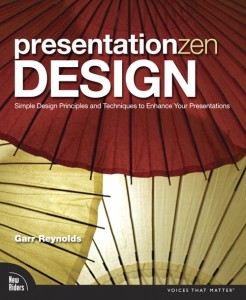
After his breakthrough book, Presentation Zen: Simple Ideas on Presentation Design and Delivery, Garr Reynolds brings us another offering to the presentation design altar, Presentation Zen Design: Simple Design Principles and Techniques to Enhance Your Presentations. If you enjoyed his first book, you should like his second book. I agree with other reviewers that it isn’t the same breakthrough as his first Presentation Zen book was, but it is a worthy follow-up book for fans of his blog and anyone who does presentation design on a regular basis. Overall, I give this book four out of five stars. Continue reading “Book Review: Presentation Zen Design”
Mar 08 2010
New Line Style Options in PowerPoint 2007
If you regularly use shapes and lines in your PowerPoint presentations, you should be familiar with the standard line style options such as width, dash type, and compound style. All of these options were in PowerPoint 2003 and have carried over to the latest version of PowerPoint. In PowerPoint 2007, they have added a couple of new options that you should be aware of — join type and cap type. Continue reading “New Line Style Options in PowerPoint 2007”
Feb 15 2010
How to Create a Sexy Curved Arrow in PowerPoint – Part II

Add a tapered "swoosh" arrow to your slides.
Back in December 2008, I published an article on how to create “sexy” curved arrows in PowerPoint 2007. I never thought that particular post would become one of my most popular articles. It highlights a problem within PowerPoint 2007 where you can no longer edit and curve the default arrows. The article shows you a workaround approach that enables you to create a nice flowing — dare I say “sexy” — curved arrow in PowerPoint 2007.
In this Part II article, I’d like to add to your curved arrow technique to your PowerPoint design toolbox — the curved swoosh arrow. It’s a little more work to create than the “standard” sexy curved arrow, but I think the effect might be worth the extra effort in some situations. Continue reading “How to Create a Sexy Curved Arrow in PowerPoint – Part II”
Jan 31 2010
PowerPoint SmartArt is Dumb

SmartArt is not PowerPoint + Bob Ross.
PowerPoint is often criticized for encouraging presenters to rely too heavily on bullet points and not helping people to communicate more visually. Microsoft added a feature known as SmartArt to help convert text into various stylized graphics. When you’re designing your PowerPoint presentation, you can quickly rotate through various shapes, colors, layouts, and styles in order to find the right graphic for your presentation.
For novice or casual PowerPoint users, SmartArt can be a handy tool for quickly making your presentation more visual and professional looking. If you decide to use SmartArt in your PowerPoint slides, you need to be careful because SmartArt is dumb. Continue reading “PowerPoint SmartArt is Dumb”
Jan 16 2010
How to Keep Your PowerPoint Creativity Flowing
It’s getting late, and you’re the last one in the office besides the late-night cleaning crew. With the soft buzz of a distant vacuum in your ear, you wonder how you’re going to bring everything together in time for tomorrow’s big presentation. You stare blankly at the empty slide in front of you, thinking just a few more slides and you’ll be done. Two hours later, tired and hungry, you’ve made some progress (if you call one mediocre slide progress) and even the cleaning crew has gone home now. Continue reading “How to Keep Your PowerPoint Creativity Flowing”
« Previous Page