Mar 17 2009

Enter the PowerPoint Design Triangle

You’ve been painstakingly working on your PowerPoint slides for the past few days. They’re close to being finished, and you decide to run them by your manager for some last-minute feedback. Big mistake. Instead of receiving the expected praise for your efforts, you end up being sideswiped by one of the following three things:

  1. Your manager asks for additional, unexpected content (e.g., “Can we add something on our new product line?”)
  2. She requests a significant change to the look and feel of your slides (e.g., “I don’t like the theme you’ve chosen or the colors you’re using.”)
  3. Your deadline changes (e.g., “I now need you to present these slides this afternoon, not on Friday.”) Continue reading “Enter the PowerPoint Design Triangle”


Tags: , , , , , ,


Mar 10 2009

PowerPoint and the Quest for the “Big Bang” Image

That's strong toilet paper...

That's strong toilet paper...

I was reading a recent post by Jan Schultink on finding that “one image or visual concept that really nails down the idea in one big bang.” Jan shared an example of a great advertising ad for Scottex toilet paper, which was highlighted on the advertising blog, adgoodness.

If you’ve read any of the popular presentation design books such as Presentation Zen or Slide:ology, you’ll be familiar with the visual presentation style that they promote. As you thumb through the pages of these books, you see several beautiful slides that demonstrate how well-chosen stock photos can emphasize a key point.

However, just looking at the finished product hides the time-consuming process that can go into finding a single “big bang” image. Sometimes it can be challenging to even find one good image for a particular slide let alone a “big bang” image. Continue reading “PowerPoint and the Quest for the “Big Bang” Image”

Tags: , , , , , ,


Mar 04 2009

Ten Commandments of PowerPoint Ninjutsu

Many business people use PowerPoint religiously each week. Although millions of PowerPoint presentations are being prepared and delivered on a regular basis around the world, it often feels as though “PowerPoint land” is a lawless “wild west”. Presentation audiences – big and small – have endured heinous PowerPoint sins for years.
PowerPoint users need to be held to a higher standard so here are the Ten Commandments of PowerPoint Ninjutsu that I came up with: Continue reading “Ten Commandments of PowerPoint Ninjutsu”

Tags: , , , , , , , , , , , , , , , ,


Feb 27 2009

Three New Gradient Effect Options in PowerPoint 2007

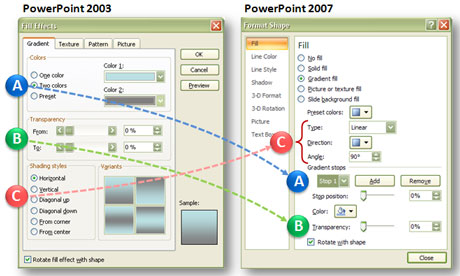
If you’re familiar with using gradient fill effects in PowerPoint, you will have noticed a change in how PowerPoint 2007 handles gradient effects (see below). In a previous article, I showed how you could reproduce the familiar gradient fill effects from PowerPoint 2003 in PowerPoint 2007.

On the left side are the gradient fill options in PowerPoint 2003. On the right side are the gradient fill options in PowerPoint 2007.

A side-by-side comparison of the gradient fill effect options shows how the application features have changed from PowerPoint 2003 to PowerPoint 2007.

Now I’ll focus on three new gradient features in PowerPoint 2007 that may open up some new effect options for you. Continue reading “Three New Gradient Effect Options in PowerPoint 2007”

Tags: , , , , , ,


Feb 23 2009

Mastering Gradient Fills in PowerPoint 2007

When you upgraded to PowerPoint 2007 from PowerPoint 2003, you might have noticed a big change in the way gradient fill effects work. When I first started using the new gradient fill effect options in PowerPoint 2007, I was a little frustrated with it. I thought that some gradient functionality had actually been removed. However, once you get oriented with the new gradient fill approach, you realize you can do what you did before with gradients and much more. Continue reading “Mastering Gradient Fills in PowerPoint 2007”

Tags: , , , , , ,


« Previous PageNext Page »
