Apr 09 2009

Tip for Resizing Objects with Text in PowerPoint

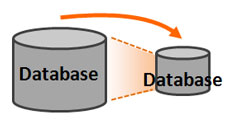
Resize the object and the text doesnt adjust with the object

Resize the object and the text doesn't adjust -- how annoying!

When you design icons or graphics in PowerPoint, you may need to incorporate text into them. What happens when you need to resize the object? If you’ve run into this problem before you know that text boxes don’t scale with the object as it is resized, even if the text box is grouped with other objects. You have to fiddle with the font size and positioning, which can be painful if you’re dealing with several objects. Continue reading “Tip for Resizing Objects with Text in PowerPoint”
Tags: , , , , , ,


Apr 07 2009

Attack of the Bad Presenters! Part II

In my previous article, I discussed how we encounter several different types of bad presenters. I covered the first five presenter types in Part I, and now I’m going to profile the next five naughty presenters. As I mentioned in the last article, conduct a little self-evaluation and survey of your peers to ensure you don’t fall into one of these “bad presenter” types. Continue reading “Attack of the Bad Presenters! Part II”

Tags: , ,


Apr 03 2009

Attack of the Bad Presenters! Part I

After you have sat through a few hundred PowerPoint presentations, you start to see patterns in the presenters that you encounter. Hopefully, you have come across some truly inspired presenters that delivered memorable, meaningful presentations. Unfortunately, for every one great presenter you stumble upon, you may run into 15-20 bad presenters along the way (not including 30-50 average presenters). Continue reading “Attack of the Bad Presenters! Part I”

Tags: , ,


Mar 31 2009

A Humble Collection of PowerPoint Quotes

When I recently needed a few quotes mentioning PowerPoint, I wasn’t able to find many very easily. As a result, I thought I would share some of the interesting PowerPoint quotes I found from various presentation experts, academia, business, and TV/movies.

Over time I will be adding more quotes to this post. Please send me any good PowerPoint quotes that you have so I can add them to this collection. Continue reading “A Humble Collection of PowerPoint Quotes”

Tags: , , , ,


Mar 24 2009

Create a Cut-Out Effect in PowerPoint

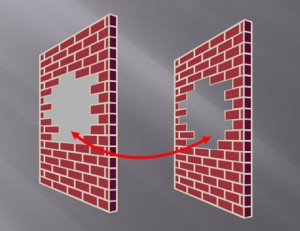
The shape on the right leverages the slide background fill effect to simulate a cut-out effect in the wall.

The shape on the right leverages the slide background fill effect to simulate a cut-out effect in the wall.

If you’ve ever needed to cut out a portion of an object, there’s really no easy way to do it in PowerPoint. You basically have to place another object on top of the object in question and fill it with the same color as the background. When the background is a solid color such as white or black, it isn’t a problem.

However, when your background has some kind of design or gradient, it can be hard to make a good match with the background. Many people may not realize that they have the option to fill a shape with the slide background, which can be used to create a simple cut-out effect. Continue reading “Create a Cut-Out Effect in PowerPoint”

Tags: , , , , ,


« Previous PageNext Page »
