 With the growing popularity of YouTube, more and more people are interested in adding YouTube videos to their PowerPoint presentations. It might be a funny YouTube video to engage your audience at the beginning of your presentation or an informative video that ties in directly with your main message. But how can you get a YouTube video into your PowerPoint slides? Continue reading “Inserting YouTube Videos into PowerPoint Presentations”
Nov 17 2008
Inserting YouTube Videos into PowerPoint Presentations
Nov 15 2008
8 Tips for Effective Team PowerPoint Presentations

What is more intimidating than a PowerPoint ninja? How about a coordinated team of angry PowerPoint ninjas? (c)iStockphoto/Ethan Myerson
In various business scenarios, you might find yourself a part of a team that is responsible for building and presenting a PowerPoint presentation. When you’re working independently on your own PowerPoint slides, you have full control over the outcome of your presentation. Coordinating a PowerPoint presentation with other individuals introduces new challenges, which can frustrate even PowerPoint ninjas who are caught unprepared. As a team, you don’t want to waste time on unnecessary or overlapping PowerPoint slides, or reworking poorly designed slides at the end. In order to be successful with group or team presentations, you should consider the following eight tips: Continue reading “8 Tips for Effective Team PowerPoint Presentations”
Nov 11 2008
PowerPoint Slides: How to Balance Simplicity with Detail
Many presentation experts recommend keeping your PowerPoint slides as simple as possible. How do you balance keeping your slides simple with providing your audience with ample information? On one hand, you don’t want to necessarily pack your business presentation with too much information leading to a death by PowerPoint experience for your audience. On the other hand, you worry about providing insufficient details for them to deeply understand your topic and apply what they learned. I will review four different tactics that you can use to overcome this challenge: Continue reading “PowerPoint Slides: How to Balance Simplicity with Detail”
Nov 08 2008
Editing Drawing Shapes in PowerPoint 2007
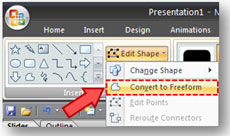
You can find the Convert to Freeform option under the Edit Shape dropdown.
A nice addition to PowerPoint 2007 is the ability to edit its built-in drawing shapes. Rather than having to draw an object from scratch using the Freeform shape tool, you can now take one of the built-in shapes and convert it into a Freeform shape. Once it is in Freeform shape, the points are editable, allowing you to add, delete, or convert points within the shape. Continue reading “Editing Drawing Shapes in PowerPoint 2007”
Nov 04 2008
The Golden Rule of PowerPoint Presentations

Among the many presentation guidelines and rules of thumb, there is only one Golden Rule of PowerPoint. (c)iStockphoto/Ayzek
PowerPoint users are constantly seeking ways to improve their presentations and frequently end up clinging to “rules” espoused by various PowerPoint presentation experts. These rules span many areas – from presentation design to delivery. You may have come across some of these rules before either in presentation books or in the form of secondhand advice from a co-worker or manager. Some of these following “rules” may sound familiar: Continue reading “The Golden Rule of PowerPoint Presentations”
« Previous Page — Next Page »


