ThinkStock

Mastering Gradient Fills in PowerPoint 2007

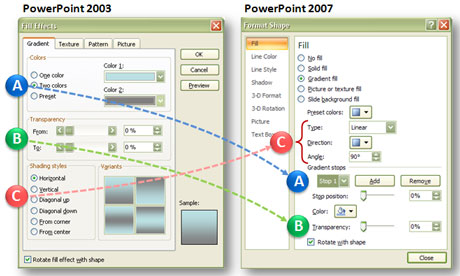
When you upgraded to PowerPoint 2007 from PowerPoint 2003, you might have noticed a big change in the way gradient fill effects work. When I first started using the new gradient fill effect options in PowerPoint 2007, I was a little frustrated with it. I thought that some gradient functionality had actually been removed. However, once you get oriented with the new gradient fill approach, you realize you can do what you did before with gradients and much more. More…


PowerPoint 2007: What is Missing-in-Upgrade (MIU)?

Chuck Norris would seriously maim the Microsoft product manager responsible for these upgrade oversights.

Chuck Norris would take down the Microsoft developers responsible for some key feature oversights in PPT 2007.

PowerPoint 2007 has many great features such as its enhanced picture effects, enhanced Presenter View, Selection Pane, Save as PDF file option, new shortcut keys (Paste Special = Ctrl + Alt + V), etc. There are some new features that I’m still not yet convinced that I like such as the Ribbon or SmartArt.

In addition to these notable enhancements, there were some features in PowerPoint 2003 that disappeared or changed in PowerPoint 2007 — but not for the better. Although I would recommend people upgrade to PowerPoint 2007 from PowerPoint 2003, I still have both versions on my work computer. I’ve identified six “missing in upgrade” (MIU) features that would push Chuck Norris and many PowerPoint ninjas over the edge. More…


Redmond, We Have a Problem: Freeform Drawing in PowerPoint 2007

Once you start drawing freeform objects in PowerPoint 2007, you quickly realize it behaves very differently than it did in PowerPoint 2003. I don’t understand why Microsoft decided to mess with something that wasn’t broken. I’ve identified three separate issues related to freeform drawing that were introduced in PowerPoint 2007. For PowerPoint ninjas, these issues are like bamboo shoots under our finger nails. Well, maybe more like hangnails — but they are really annoying! More…


Shape Resizing Issue in PowerPoint 2007

When you transition from PowerPoint 2003 to PowerPoint 2007, you might come across an annoying issue when you try to resize a shape. For some reason, the shape or object cannot be resized by dragging one of the corner or side points. Instead of holding the new size, it snaps back to a smaller height. You can manually format the size of each shape by specifying the exact height, but that can be a tedious process after a few shapes. More…


Line Spacing Tips for PowerPoint 2007

How to access the line spacing options in PowerPoint 2007.

How to access the line spacing options in PowerPoint 2007.

If you used PowerPoint 2003 and recently upgraded to PowerPoint 2007, you probably noticed a significant change in how PowerPoint 2007 handles the line spacing of text within your slides. Line spacing in PowerPoint 2007 and Word 2007 are now almost exactly the same. Microsoft obviously wanted to create a unified approach to line spacing across its Microsoft Office suite. However, the simple and straightforward approach in previous versions of PowerPoint is now a little more tricky. More…


Page 2 of 3«123»